Thursday, 1 November 2012
BenQ MS517 – primul proiector 3D de buget
BenQ MS517 este primul proiector 3D destinat segmentului de piata mainstream. Printre caracteristici se numara lampa cu o durata de functionare de pana la 6500 ore, aproape de 3 ori mai mult decat la alte modele de proiectoare, un contast nativ specificat de producator de 13.000:1 si o luminozitate de 2800 ANSI Lumeni.
Consumul a fost de asemenea redus cu pana la 70 procente, insa aici vorbim de modul ECO pe care il detine aproape orice proiector si care scade atat contrastul cat si luminozitatea imaginii. Diagonala proiectata se pastreaza la 7,62 metri, aceasta fiind optima pentru o imagine clara si cu un nivel de luminozitate si contrast optime. Difuzorul de 2 W incorporat ma indoiesc ca este optim pentru vizionarea de filme. Cat despre partea 3D aceasta este disponibila in principal prin interfata HDMI 1.4a cat si prin celelalte tipuri de conexiuni. Spre surprinderea noastra proiectorul are si meniul complet tradus in limba romana.
Pretul de raft al acestui model este de 1900Lei si primul lot livrat la noi in tara va include in acest pret, ochelarii 3D, care, achizitionati separat au un pret de 450Lei.
HP anunta noua gama de laptopuri si ultraportabile cu sistem de operare Windows 8
"Portofoliul HP de notebook-uri ultra-subtiri, desktop-uri all-in-one elegante si PC-uri de business ultra-performante este conceput pentru a satisface nevoile consumatorilor care vor sa foloseasca sistemul de operare Windows 8," a declarat James Mouton, vicepresedinte executiv si manager general, Personal Computer Global Business Unit, HP.
"Consumatorii individuali si organizatiile pot de acum inainte sa aleaga dintr-o gama larga de PC-uri HP, care dispun de ecrane multitouch, forme flexibile, design elegant sau solutii personalizabile, menite sa acopere nevoile fiecarui utilizator."
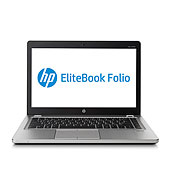
- HP EliteBook Folio 9470m este un ultrabook subtire, usor si eficient. Cu functionalitati premium de docking si baterie interschimbabila, HP EliteBook Folio este destinat pofesionistilor aflati in continua miscare.
- HP SpectreXT TouchSmart Ultrabook este un ultrabook premium cu un ecran multitouch IPS Radiance Full HD de 15,6 inch, ultra-performant si cu un design metalic sofisticat. Având o grosime de numai 17,9 mm, acest ultrabook este primul notebook HP care incorporeaza tehnologie Intel Thunderbolt, ce asigura un tranfer ultra-rapid de muzica, filme si date catre alte dispozitive externe.
- HP ENVY TouchSmart Ultrabook 4 dispune de un ecran HD multitouch de 14 inch, un subwoofer puternic cu Beats Audio si o placa grafica AMD optionala cu 2G de memorie.
- HP Pavilion Sleekbook 14 si HP Pavilion Sleekbook 15, disponibile in variantele de culori negru lucios si rosu rubiniu, asigura consumatorilor performantele si aplicatiile de care au nevoie zilnic, acum intr-o forma ultra-subtire.
Samsung lanseaza Galaxy Premier
Samsung anunta un nou model de smartphone destinat entuziastilor care nu au fost convinsi deja de performantele smartphone-ului Galaxy SIII.
Noul Gaxy S III Mini s-a dovedit un terminal mult prea simplu pentru a atrage o mare parte din fanii seriei Galaxy, asa ca producatorul coreean trebuia sa scoata un nou terminal capabil sa inregistreze ceva mai mult succes in vanzari. Asadar noul telefon pastreaza acelasi design, vine dotat cu un display usor mai mic, Super AMOLED de 4,65 inci la 720x1280 pixeli, un procesor dual-core TI OMAP 4470 la 1,5 GHz, 1GB RAM si Android Jelly Bean.
La capitolul conectivitate Samsung Galaxy Premier va beneficia de Bluetooth 4.0 si NFC, iar camera principala va captura fotografii la 8MP si videoclipuri Full HD.
Momentan telefonul a fost anuntat oficial doar in Ucraina, unde ar trebui sa fie disponibil incepand cu luna noiembrie pentru aproximativ 670 de dolari.
Mai mult ca sigur acest model va avea drept target atragerea utilizatorilor indragostiti de Galaxy SIII si care mai mult ca sigur nu se vor orienta catre S III Mini. Pe de alta parte trebuie avut in vedere si pretul care cel putin pentru moment este setat destul de sus atat in cazul Galaxy Premier cat mai ales pentru S III Mini. Urmeaza sa vedem la ce preturi vor intra cele doua noi terminale si pe piata din Romania si daca vor reusi sa puncteze pe acest sfarsit de an.
Samsung Smart Dock iti transforma Galaxy Note II-ul intr-un mini PC
Incercand sa compenseze disparitia webtop-ului din portofoliul Motorola, Samsung vine cu un dock care iti transforma Galaxy Note II-ul in PC.
Dispozitivul din imaginea de mai sus poarta numele de Smart Dock si este destinat extinderii functionalitatii recent lansatului Galaxy Note II.
Smart Dock-uul pentru Note II, pe langa faptul ca incarca phonebletul, integreaza 3 porturi USB, iesire audio si si un port HDMI. Daca partea de iesiri audio/video nu vine neaparat ca o surpriza, mai interesante sunt cele 3 porturi USB. Dupa specificatiile Samsung, la acest dock ar trebui sa puteti conecta fara probleme un mouse, o tastatura sau un mediu de stocare extern.
Pretul in SUA pentru acest accesoriu este de 100 dolari, o cifra care in tara noastra are mari sanse sa se apropie de 99 euro. In cazul in care folositi Note II-ul ca un portal de continut multimedia pe care il vizionati saptamanal, acest dock s-ar putea sa fie exact ceea ce aveti nevoie.
How to download Youtube videos
Whether it's your favorite music, video tutorials or funniest home videos, you may want to keep a copy of them on your computer. After you downloaded the file, you can upload it on your iPhone, iPad or any multimedia player with video capabilities , you can even burn a DVD and watch them on your TV.
My personal preference is an addon for Mozilla Firefox called Download YouTube Videos as MP4 and FLV , just follow this link and then click Add to Firefox .
The addon will be downloaded and installed automatically. When the installation is complete just restart Firefox, visit YouTube and you will see a Download button just below the video.
Labels:
It is similar to the Ancient,
This article explains about how to turn your windows 7 laptop into a .,
turning,
Turning your windows 7 computer into a Virtual wi-fi,
uk,
windows,
Windows 7 Virtual WiFi Router download for free. You can ... Convert your PC into a WiFi hot spot for free. ... Contact us at : ravieeswar virtualwifirouter.com,
youtube
Turning your Windows 7 computer into a Virtual Wi-Fi router
A cool new feature, now Windows 7 is able to share your internet connection via software.
The operating system can use any compatible wireless adapter and turn it into a Wi-Fi router in a few simple steps.
Once it's set up, any Wi-Fi enabled device (Laptop, iPhone, Android device, wireless printer) can use your computer’s internet connection to get online.
Intel, Atheros, Broadcom, Realtek now include support in their latest drivers. Anyway it’s best to check their support websites to see compatible wireless adapters .
After you installed the latest Windows 7 driver for your Wi-Fi adapter, the next thing to do is to set up the “software router”:
Click the Start button, in the “Search Programs and Files” box type CMD, right-click the Cmd.exe icon and select "Run as Administrator".
In command prompt type the following :
netsh wlan set hostednetwork mode=allow ssid=MyNet key=MyPassword
and press [Enter].
Replace "MyNet" with the name you want to use for your network, and "MyPassword" with any password you like to have for your network
!!! Make sure you use only WPA2 keys are allowed, it is a hardware requirement for the Wireless Cards to be certified with the Microsoft Logo for Windows 7 to only allow WPA2 keys for the Virtual Access Point.
Now it’s time to start our new Virtual Wi-Fi router, type :
netsh wlan start hostednetwork and press [Enter]
!!!Make sure you have your wireless adapter enabled (mostly on laptops you) or you will receive this error :
C:\windows\system32>netsh wlan start hostednetwork
The hosted network couldn't be started.
A device attached to the system is not functioning.
If everything is ok you should receive this message :
C:\windows\system32>netsh wlan start hostednetwork
The hosted network started.
!!!Of course you can stop it whenever you want typing : netsh wlan stop hostednetwork
There is one last step we have to complete and that is sharing your cable connection using the Virtual Wi-Fi adapter .
Go to Control Panel > Network and Sharing Center > Change Adapter Settings, right-click your internet connection and select Properties. Click the Sharing tab, check "Allow other network users to connect through this computer’s Internet connection", and choose your virtual Wi-Fi adapter .
Now any Wi-Fi enabled device in range should see a network with the SSID you defined above, and be able to connect to it with the specified password.
For those of you who need more info about this service, see Microsoft’s official description here and here,
Alternatives can be found here :
Labels:
america,
audi,
bmw,
car,
ebay,
facebook,
galati,
london,
Molten,
money,
porn,
redtube,
s the first letter and vowel in the ISO basic Latin alphabet. It is similar to the Ancient,
Samsung,
This article explains about how to turn your windows 7 laptop into a .,
turning,
Turning your windows 7 computer into a Virtual wi-fi,
uk,
windows,
youtube
Subscribe to:
Comments (Atom)